Stone Wall 205: A Versatile 3D Model for Architectural Visualization, Games, and 3D Printing
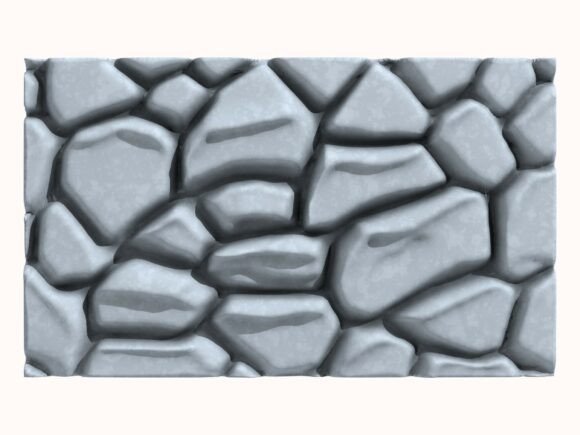
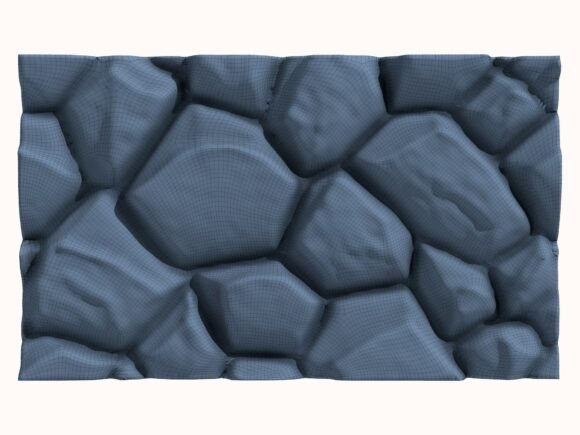
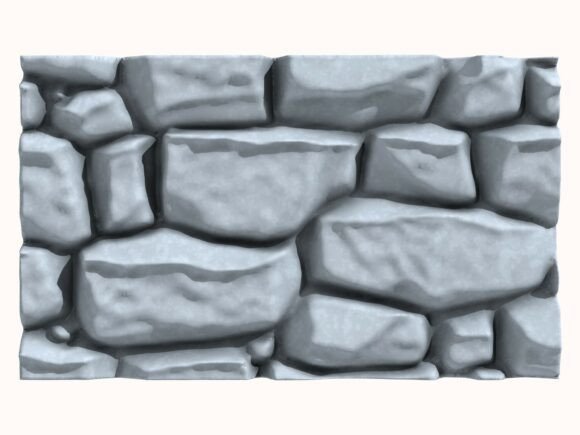
Stone Wall 205 is a high-quality 3D stone wall model meticulously handcrafted in Cinema 4D. This model is ideal for a wide range of applications, including architectural visualization, game development, and 3D printing projects. The package includes multiple file formats (C4D, STL, OBJ, FBX, ABC, and DAE), making it highly versatile and compatible with various software and platforms. Additionally, the package comes with six high-resolution JPEG renders (2000x2000px, 300 DPI) that showcase the model from different angles, providing a comprehensive visual reference.
Understanding the Value of Stone Wall 205 in Your Workflow
Integrating Stone Wall 205 into your project can significantly enhance the quality and realism of your designs. Whether you are an architect, game developer, or 3D printing enthusiast, this model offers a robust solution for creating detailed and authentic stone walls. The handcrafted nature of the model ensures that it stands out with its unique texture and design, adding a touch of authenticity to your projects.
Preparation and Compatibility
Before incorporating Stone Wall 205 into your project, it's essential to ensure compatibility with your existing tools and software. The model is provided in several formats, each tailored to different use cases:
- C4D (Cinema 4D): Ideal for users working within the Cinema 4D environment, offering seamless integration and full access to the model's features.
- STL (Stereolithography): Suitable for 3D printing, providing a clean and printable format for physical prototypes and models.
- OBJ (Wavefront Object): A widely supported format that works well with most 3D modeling and rendering software.
- FBX (Filmbox): Useful for game development and animation, as it supports both geometry and animation data.
- ABC (Alembic): Ideal for complex animations and simulations, offering efficient data exchange between different software.
- DAE (Collada): A standard format for exchanging 3D assets between different applications, ensuring broad compatibility.
Practical Implementation Tips
Once you have the appropriate format, here are some practical tips for integrating Stone Wall 205 into your workflow:
- Import and Placement: Import the model into your software and position it according to your project's requirements. Use the included renders as a reference to ensure accurate placement and scaling.
- Texture and Material Adjustments: Customize the textures and materials to match the aesthetic of your project. The detailed texture of the stone wall can be adjusted to fit different environments, whether it's a modern, rustic, or historical setting.
- Lighting and Rendering: Set up appropriate lighting to highlight the details of the stone wall. The high-resolution renders provided can serve as a guide for achieving the best lighting and rendering results.
- Integration with Other Assets: Combine Stone Wall 205 with other 3D assets to create a cohesive and realistic scene. For example, in architectural visualization, you can add furniture, plants, and other elements to complete the interior or exterior design.
Use Cases and Applications
Stone Wall 205 is a versatile asset that can be used in various contexts:
- Architectural Visualization: Create realistic and detailed visualizations of buildings, interiors, and exteriors. The stone wall can be used to add a touch of authenticity and texture to your designs.
- Game Development: Incorporate the stone wall into game environments, such as castles, dungeons, or ancient ruins. The model's high detail and texture make it suitable for close-up views and immersive gameplay experiences.
- 3D Printing Projects: Print the stone wall for physical prototypes, dioramas, or scale models. The STL format ensures that the model is ready for 3D printing, allowing you to bring your designs to life.
Quality Control and Long-Term Use
To ensure the highest quality and long-term usability of Stone Wall 205, consider the following:
- Regular Updates: Keep the model and your software up to date to benefit from the latest features and improvements.
- Consistency in Design: Maintain consistency in the design and style of the stone wall across different projects to build a recognizable and professional portfolio.
- Feedback and Iteration: Gather feedback from clients, colleagues, or end-users and use it to refine and improve the integration of the stone wall in your projects.
Conclusion
Stone Wall 205 is a valuable asset for professionals and enthusiasts alike, offering a high-quality, handcrafted 3D model that can be seamlessly integrated into various workflows. By following the practical implementation tips and leveraging the model's versatility, you can enhance the realism and detail of your projects, whether in architectural visualization, game development, or 3D printing. With its multiple file formats and high-resolution renders, Stone Wall 205 is a reliable and flexible solution for bringing your creative visions to life.